



























Get a Quote
Tell us your on site IT training requirements and we’ll get back to you the next working day
on-site IT classroom training – the classic setup. A room of people on laptops, and one instructor up the front. Traditional yet interactive sessions for up to eight people. A lively modern approach combining presentation, live demonstrations, hands-on practical sessions and full course notes for attendees to take away. When identifying training needs, we will […]
On-Site IT Training for Business
Wednesday, October 21st, 2020
Get a Quote
Tell us your on site IT training requirements and we’ll get back to you the next working day
Even today with higher levels of remote working, on site IT training for business and public sector organisations alike remains an important activity. There are circumstances when nothing will be better than having a trainer physically present to interact with attendees without the risk of distraction that can accompany home working. We offer a range […]
Work from home with Glide Training during the Coronavirus crisis
Wednesday, March 25th, 2020
Coronavirus has affected us all, with a major impact on how we work. Clearly it will not be possible for Glide to deliver on-site training courses for the foreseeable future, and it is likely that a large proportion of our clients’ workforce will be working from home over the same period. However we can help […]
Cookie Policy
Tuesday, May 8th, 2018
This site uses cookies – small text files that are placed on your machine to help the site provide a better user experience. In general, cookies are used to retain user preferences, store information for things like shopping baskets, and provide anonymised tracking data to third party applications like Google Analytics. How do I change […]
Managing Change in the IT World – My PC Pro Magazine Article
Monday, November 13th, 2017
Written by Jane Hames
For any organisation, changing software can be seen as a major headache. As any IT professional involved in such projects will know, changing an IT system isn’t as simple as buying a new product and rolling it out to the users. There are many implications for the users of the new system which, if acknowledged, will make for a much smoother and more positive go-live.
An IT trainer’s role in the project may appear to be simply to learn how the new system works and train the users on how to use it (rather naively, I approached my first role on this type of project with the attitude that it would be as simple as that!) As the upgrade trainer I am one of the key people at the front end of communicating what the changes are, and how users will benefit from them.
I don’t often get involved in the more nitty-gritty technical aspects of upgrade projects. Instead, by being the user-facing “people person” I have the opportunity to take an objective view from the outside. This enables me to make suggestions for actions we could take early on, to ensure a positive experience for users when they get to the point of transition from one system to another.
In the latest issue of PC Pro magazine, I have written an article which contains lots of ideas about how to manage upgrade projects and I share with you some of my experiences and what I have learnt along the way. If you want to buy online click here: https://subscribe.pcpro.co.uk
If you want to buy it in print, here’s the cover you are looking for:

-->
Written by Jane Hames For any organisation, changing software can be seen as a major headache. As any IT professional involved in such projects will know, changing an IT system isn’t as simple as buying a new product and rolling it out to the users. There are many implications for the users of the new […]
Our Costs
Sunday, March 5th, 2017
We strongly believe in a fair price for a good service. High-quality training will give you the best return on investment, whereas cheap training can be a false economy that fails to deliver the long-term results you need. We seek to provide the highest levels of personalised service and support at an honest price. A […]
How to get even more than training from your training!
Thursday, January 5th, 2017
Written by Jane Hames
You might be surprised how easy it can be to get much more than what is traditionally expected from your training.
Imagine that you have a training course booked in for next week. Of course, you are hoping to learn some useful information and techniques. I would expect that you also hope to feel confident that you can put these new techniques into practise when you return to work, but how could you make absolute best use of this time in the training room?
I have been an IT trainer since 1998, and every time I see a group of people get together for the training, whether they are total strangers or colleagues, if they choose to, they can get way more from the day than perhaps expected. I am not talking about the content of the training or the objectives you want to achieve in order to help you back in the work place, you can read my tips about this here:
Easy ways to prepare to get the most from your training
I am talking about what ELSE we can achieve…
Company Communications
As an IT trainer, I have found that IT training can be an ideal opportunity for basic IT communications. You need to be careful though; the start of a training course is not the ideal time to impart information of a contentious nature. Likewise, anything that would lead to discussions that would hinder rather than help the objectives to be achieved should also be avoided. Here are some examples where I have been able to help share and implement new IT information for my customers:
A new PowerPoint template – the customer gave the template ahead of the training so that I could understand and then pass it on to those attending the training. This was a great way to tell people about the new template and learn to use it at the same time. This also works well for on going PowerPoint training where the template isn’t new, but new starters or those new to software can learn to use the template from the outset.
Re-enforcing email guidelines – on many occasions, I have been able to pass on information such as inbox size, email archiving systems, attachment sizes, for internal use creating shortcuts to files rather than adding attachments in the email and so on. When you first start a job, you might receive an induction, but often there’s a lot to take in, so including this in Outlook training can save the users and the IT team lots of frustration.
IT Policy – when delivering new starter or induction training, things like IT policies can be included.
New software plans – perhaps your company is upgrading to a newer version of the software used in the very near future. Delivering training with the new version is the perfect way to ensure that users feel ready for the upgrade.
Networking opportunities
Whether it’s a public course with total strangers or a in-company course with your colleagues, a training course is a great time to get to know other people, learn from them and help them.
Getting to know colleagues – when delivering training for large organisations, I often meet people who don’t know each other or they’ve only communicated by email or phone. It’s a real morale booster to put a face to the name and build on that relationship.
Meeting new people – if you are with people from other organisations, make sure you swop business cards, arrange to meet for a coffee or just connect on LinkedIn. You might be able to help one another or pass an opportunity there way in the future.
Learning some usual information – I learn so much by being with different groups of people several times a week. As a training attendee, you can learn some very useful things from others about your own organisation or about opportunities and lots of other things going on in the world!
Career opportunities – you might meet someone within your own company who is looking to recruit a new role that you would love. Likewise outside of your company…it’s back to the old saying “it’s not what you know, it’s who you know”
Team building – put on a course on any subject that would be useful for your team and the team building should happen naturally.
Time to reflect
Time away from your everyday tasks – this is essential for our well-being and can be very productive. When delivering IT training, I meet people who have become bogged down with their work and the methods that they have got used to. Being in the training room, often prompts new ideas and new ways of working that will be much more efficient and bring more value to them and their organisation.
Idea swaping – just the act of sitting next to someone different for the day can bring about all sorts of new ideas. With software and other processes, there can be many ways of getting to a similar end result. Maybe there’s a new method that you might prefer or some techniques that would help your training-neighbour.
Getting a well deserved break from a big office or from your home office – time out of your usual working environment can be very refreshing. Make the most of it – meet some new people, learn some new things and share some knowledge with your new friends!
-->Written by Jane Hames You might be surprised how easy it can be to get much more than what is traditionally expected from your training. Imagine that you have a training course booked in for next week. Of course, you are hoping to learn some useful information and techniques. I would expect that you also […]
Privacy Policy
Monday, February 22nd, 2016
Glide Training is committed to safeguarding the privacy of our website visitors and service users. Our privacy policy is designed to ensure we comply with the provisions of the latest European privacy and data protection regulations (GDPR). The policy sets out our obligations as an organisation that controls data, and the rights you have as […]
Data Protection Policy
Monday, February 22nd, 2016
Glide Training is committed to protecting the rights and freedoms of data subjects and safely and securely processing their data in accordance with all of our legal obligations under the latest data protection regulations (GDPR). All our employees and directors must comply with our data protection policy which sets out the legal basis on which […]
Turn a positive number into a negative in Excel using Paste Special
Wednesday, April 29th, 2015
Written by Jane Hames
Turn a positive number into a negative in Excel using Paste Special
During Excel training last week, I was asked how to turn a positive into a negative in Excel. The Excel user was calculating balances but the expenses came in form Sage as positive values, whereas they needed to be negative values.
The ABS function can be used to turn a negative into a positive (see how to do that here). To turn a positive into a negative you can use Paste Special. This is what we did:
- Starting with a sheet laid out a bit like this example, type -1 (in yellow here) somewhere on the sheet. This -1 will be used to multiply our positive numbers by minus 1.

- Highlight the cell with -1 in it.
- Select copy.
- Highlight the cells to be changed into negative values. (You should still have the dotted outline showing around the -1 cell to indicate that this cell has been copied.)

- Select Paste Special from the arrow on the Paste button on the Home tab.
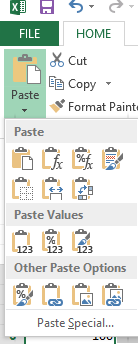
- From the Paste Special box, select Multiply, then click on OK.
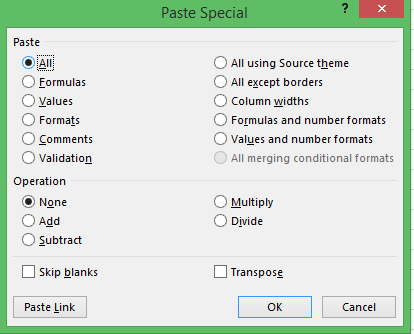
- Your positive numbers are now negative.

- I finished this off by calculating the sum of my incomings and outgoings to give me the balance.
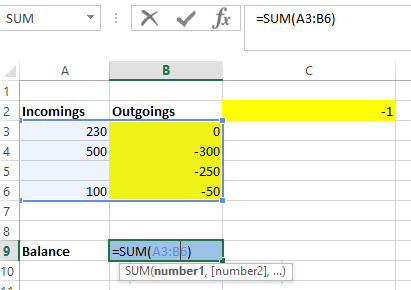
Excel training is the most commonly requested subject at Glide Training. We have helped hundreds of people to become more efficient and to enjoy their Excel use.
Written by Jane Hames Turn a positive number into a negative in Excel using Paste Special During Excel training last week, I was asked how to turn a positive into a negative in Excel. The Excel user was calculating balances but the expenses came in form Sage as positive values, whereas they needed to be […]